6. Automate with watchers
A watcher checks GitHub on a schedule and starts runs by itself — as long as the Foundry is
running (see Keep it running). GitHub access uses the gh CLI's login.
Sources#
| Source | Starts a run when… | Default flow |
|---|---|---|
| Issues | an open issue has the trigger label | issue-gitflow (or issue-plan / issue-code-daily for the human-in-the-loop pipeline) |
| Schedule | it is time (every N, or once a day at a set time) | release-daily |
| Monitor | never — it checks the Foundry itself and records problems (see The monitor) | none |
| Review comments | someone comments on a Foundry PR (branch factory/*) | none shipped — name your own flow |
| CI failures | the latest CI run of a workflow on the default branch failed | none shipped — name your own flow |
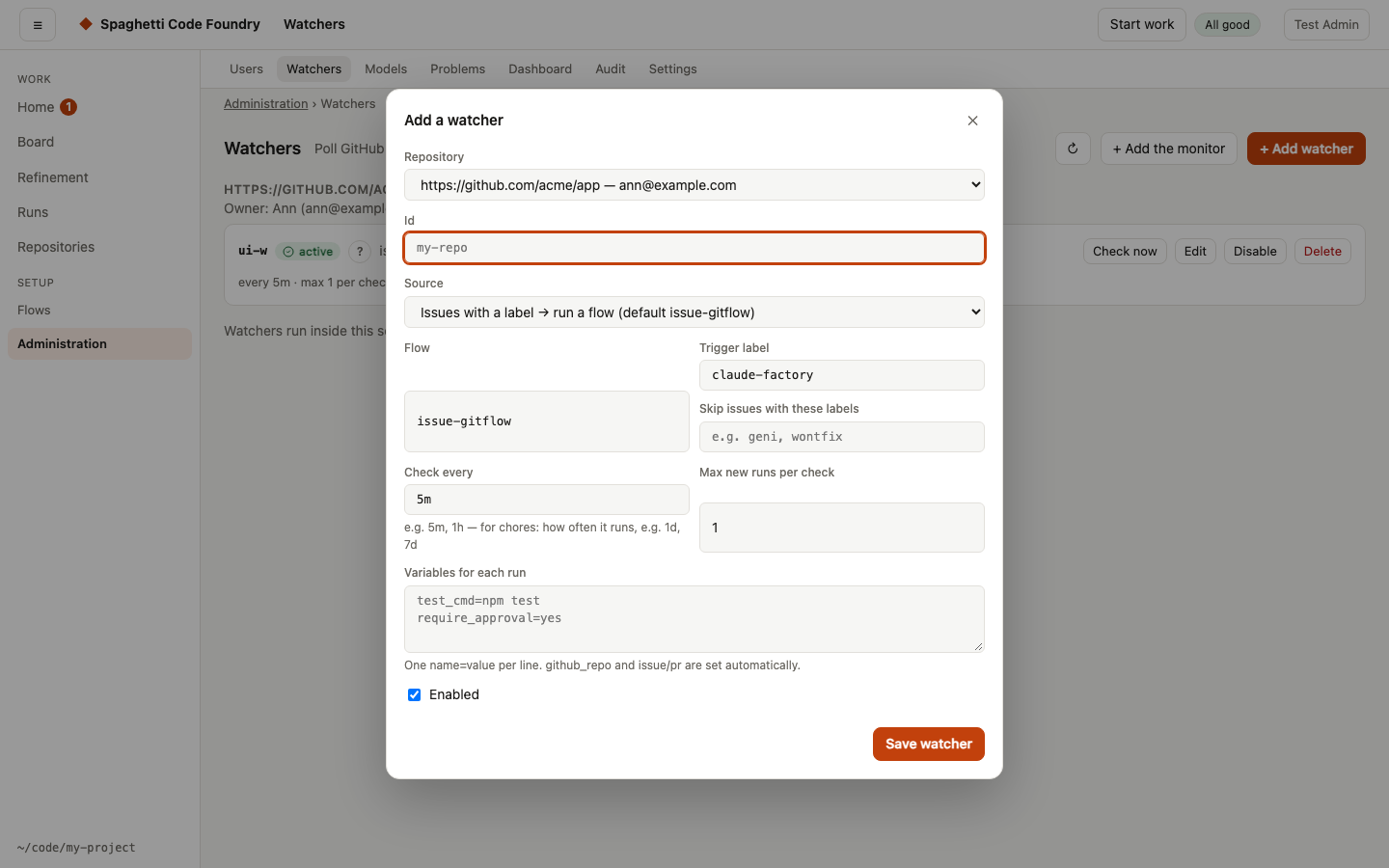
For a schedule, the text becomes the run's task. Intervals: 30s, 5m, 1h, 7d; or set
Once a day at 17:00 with a time zone.
Options of an issues watcher. The form has three groups, collapsed by default; each control shows its default and one sentence on what it does. Only issues watchers show them.
- Labels: labels that go first (default
bug), a text for each status label (working, done, needs info, waiting, failed; default is the Foundry's own name), and labels to remove when a run succeeds. - Dependencies: wait for dependencies (default on), labels that count as done, a pause while a pull request whose branch starts with a text is open (cleared by an empty field), and one run at a time (default off).
- Comments: a status comment (default on), a comment when a run fails (default on), a questions check (a flow run once over all new issues before any starts; default none), and answer questions automatically (default off). It means the Foundry answers its own questions with its recommendations, at most twice per issue; after that a person answers.
A field that is cleared is removed from the watcher, so the default applies. A value the server refuses is shown at its field with the server's message. The same options work for a watcher of a repository and for one still in config.yaml.
The Watchers page (admins)#
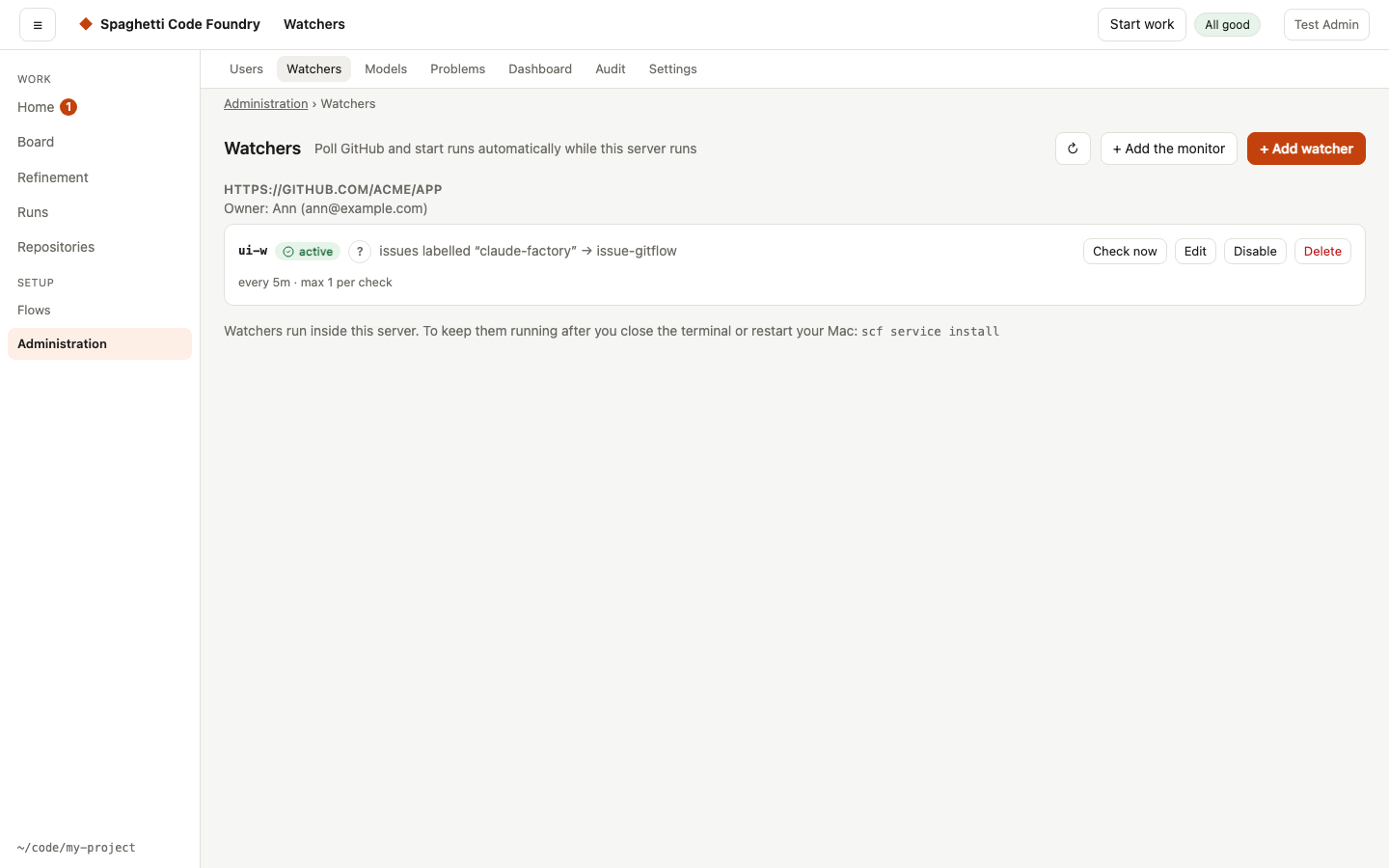
Only admins see the Watchers page. No watcher name or status shows anywhere else. A user sees the runs a watcher started on their repository in My runs, without the watcher's name.
- From the repository. The heading of each repository group is a link to the repository view (
#/repos/<id>). Its Watchers section lists the watchers of that repository, with + Add watcher and, per watcher, Enable or Disable, Edit and Delete (Delete asks first). If the server refuses a change, its sentence is shown. - By repository. Watchers are grouped by connected repository. Each group shows the repository's owner (with a "blocked" mark when the owner is blocked). Runs of a watcher belong to that owner.
- Add watcher. Choose the repository from a list, then the flow, the labels and the other options. There is no
ownerfield: the repository's owner is used. Repositories that cannot have a watcher (a deploy key, or not on GitHub) are listed as not available, with the reason. - Variables. The form shows one field per variable the chosen flow describes, with its label, help and default (as the placeholder): a number field with its range, a switch, a text box, a list or a choice. Changing the flow changes the fields. A field left at its default is not stored. Variables the flow does not describe go in the box "Variables for each run", one
name=valueper line; a described variable typed there moves to its field when the form opens.agent_envis a list ofKEY=valuepairs and may hold secrets. - Edit, enable, disable, delete. These change the watcher at once. Options the form does not show are kept when you edit. If the server refuses a change, its sentence is shown as it is.
- One watcher. The list is compact: the id (a link to
#/watchers/<id>, crumbs Administration › Watchers › <id>), the state mark, what it does, the last successful check and a problem line. The watcher's page has the next steps, notes, error details and recent activity; for the monitor also the bug-story switch and the findings. Check now, Edit and Enable or Disable are together; Delete is alone in a Danger group. List rows have no Delete button. - The monitor stays on the page, under "The Foundry itself", and is still saved in
config.yaml. If only the monitor cannot be loaded, the watchers are still shown and the monitor card says so, with Retry. - While it works. The page shows a grey skeleton while it loads. Check now shows "Checking…" next to its own button. Delete asks first in a dialog. If a reload fails, the list stays and a line says when it was last updated, with Retry. The same holds for Users and Problems.
- From config.yaml. A watcher that is still in
config.yaml(for example while there is no admin account, or at the connection limit) shows read-only with a note, and Check now. A watcher whose repository is gone can only be deleted.
Watchers of a repository (API)#
The page uses these routes. A watcher stored for a connected repository has the same options as one in config.yaml, except github_repo and owner: they come from the
repository. The source monitor is not allowed.
- Routes:
GETandPOST /api/admin/repos/:id/watchers, andPUTandDELETE /api/admin/repos/:id/watchers/:wid. A user gets 403. Changes go to the log. A change starts, stops or restarts the watcher at once. A described variable whose value does not fit its kind or range is refused (400, the message names the variable, asvars.<name>: …); a stored value that is already out of range still runs and is refused only when the watcher is saved again.GET /api/admin/reposadds awatcherProblemsentence to a repository that cannot have a watcher. - Which repositories: GitHub only, with the sign-in
none(the owner is an admin),github-tokenorgithub-app.ssh-deploy-key,https-tokenand other addresses are refused. - The id is unique on the whole install, in the store and in
config.yamltogether. A duplicate is refused. - Runs belong to the repository's owner, so they show in that user's "My runs".
- Lists:
GET /api/watchersalso shows stored watchers, with theirrepoId. A stored watcher that cannot run shows aproblemsentence. - Blocked owner: while the owner is blocked, the watchers of their repositories are paused. They check nothing and start nothing, and the list shows "paused: the owner is blocked". Unblocking starts them again, without a restart. This also works for
scf user blockandscf user unblock: the server sees it within its usual sweep. Runs that are already going are not touched. - Removed with their repository: when a repository is removed (by id or by name), or its owner is deleted, its stored watchers are stopped and removed in the same step. The audit log says so. A watcher found at start whose repository is gone is removed and logged.
- Transfer: a transferred repository keeps its watchers. They run for the new owner, and new runs belong to the new owner.
- Sign-in: a stored watcher talks to GitHub with its repository's own credential: the stored token, a GitHub App token limited to that repository, or the server's own
ghlogin for the methodnone. With a token or the app, the server's login is never used, so one repository's watcher cannot see another. The same credential is used for the actions on its items under "Your turn". Watchers inconfig.yamlkeep using the server's login. - When the sign-in does not work (missing, unreadable or refused, or the owner of a
nonerepository is no admin), the watcher makes no GitHub call and its status says so in a plain sentence. It works again by itself at the next check once you fix the credential. - Status comments: a status comment is only edited by the account that wrote it. When a watcher's account changes (for example a new token of another account), it posts a new status comment and the old one stays as it is on open issues.
- Request limit: a repository token or app has its own GitHub request limit. The limit the Foundry shows is that of the server's own login and the bot.
Watchers move from config.yaml to their repositories#
When the server starts after the update, every watcher in config.yaml except the monitor moves to the repository store. Nothing to do — it happens by itself.
- Same watcher. Its id, options and enabled state stay the same, so run history, status comments and labels on GitHub keep matching. A repository name with capital letters (
Acme/App) keeps its spelling. - Repository not connected yet: it is connected for the first admin with the method
none. The admin pages show it as none (legacy): the watcher uses the server's ownghlogin, as before. - Repository already connected (for example by a user): it keeps its owner and method, and the watcher is attached to it. If that method cannot run a watcher (a deploy key, or
noneowned by someone who is no admin), the watcher moves but is disabled. The log and the Watchers page say why. - The
owneroption goes away. The repository's owner owns the runs. If the option named another account, the log says so. - The backup. Before it changes
config.yaml, the Foundry copies it toconfig.yaml.before-watcher-move-<date>-<time>next to it. The moved watchers are then removed fromconfig.yaml; the rest stays the same. Comments in the file are lost, so use the backup to see them. The log names every moved watcher. - No admin account yet: nothing moves. The watchers keep running from
config.yamland move at a later start, once an admin exists. - At the connection limit (50 per account): the remaining watchers stay in
config.yamland the log says so. - Safe to repeat. If the server stops halfway, the next start finishes the move without duplicates. A watcher you add to
config.yamlby hand later moves at the next start. A watcher whose stored copy differs, or whose id is used twice in the file, stays in the file and is logged. - After the move, saving
config.yamlthroughPUT /api/configwith a new or changed watcher other than the monitor is refused, with a sentence that points to the Watchers page. Add and edit watchers there. scf watchworks as before, with the server's own login.
Going back. Stop the server, copy the backup over config.yaml, and delete the moved watchers on the Watchers page first (or remove them from repo-watchers.json in the data folder). Otherwise the next start moves them again.
The watchers are kept in repo-watchers.json in the data folder.